
Terms of Service Guide
Getting your customers to accept 1Money's terms
Every customer you onboard has to agree to 1Money's Terms of Service before their account can be opened. There are two ways to collect that agreement. This guide walks you through both, and shows you exactly what we need to see to switch the second one on.
Section 1 - The agreements your customer accepts
Both paths cover the same five documents. Nothing here is optional, and nothing can be collected later.
| Agreement | Term link | Term key |
|---|---|---|
| Account Terms and Conditions | Commercial Agreement / Retail Agreement | COMMERCIAL_ACCOUNT_TERMS_AND_CONDITIONS |
| Disclosures | Customer Onboarding Disclosure | INTERNATIONAL_CUSTOMER_ONBOARDING_DISCLOSURE |
| Privacy Policy | Privacy Policy | PRIVACY_POLICY |
| Cookie Policy | Cookie Policy | COOKIE_POLICY |
| E-Sign Consent | E-sign Consent | E_SIGN_CONSENT |
Section 2 - Two ways to collect acceptance
Most partners start hosted and move to partner-hosted once the rest of the integration is live. You can switch later without re-onboarding anyone.
| Path A 1MONEY-HOSTED | Path B PARTNER-HOSTED | |
|---|---|---|
| Who builds the UI | 1Money | You |
| Proof you send | signature_id | signed_at |
| Approval needed | None | Compliance review |
| Effort | One extra API call | UI build plus a screenshot pack |
| Best for | The fastest route to production | A fully white-labelled flow |
PICK ONE
Use either a
signature_idor a set ofsigned_attimestamps on a given onboarding - never both on the same request.
Section 3 - Path A (the 1Money-hosted page)
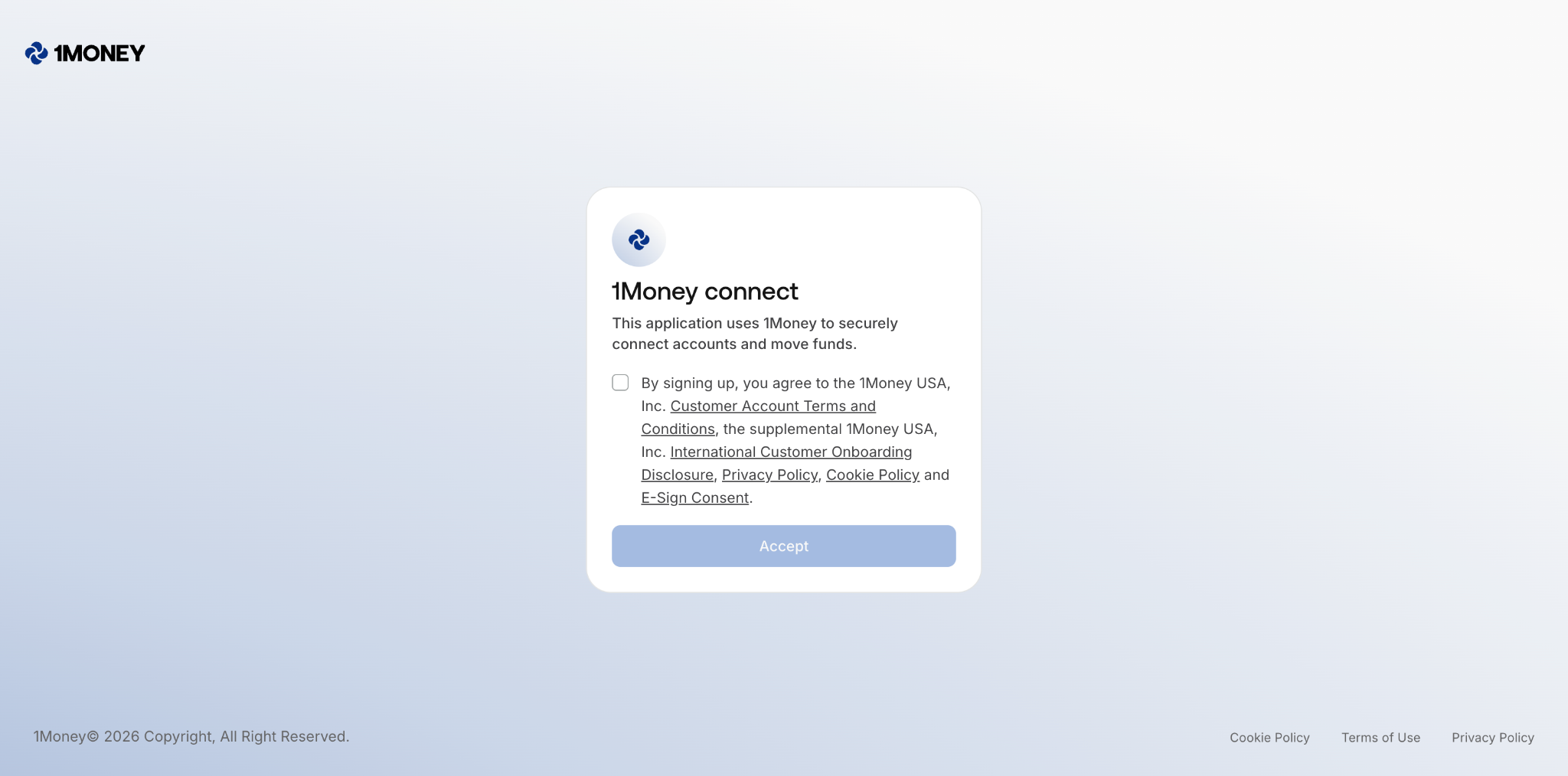
Three steps, and we handle the wording, the layout and the audit trail.
Step 1 — Create the signing session
Call this when the customer actually reaches the terms step. The link expires about an hour after you make it.
POST https://api.1money.com/v2/terms/{type}/signatures
curl -X POST https://api.1money.com/v2/terms/BUSINESS_ONBOARDING/signatures \
  -H "Authorization: Bearer $API_KEY" \
  -H "Content-Type: application/json" \
-d '{ "redirect_url": "https://partner.example.com/onboarding/terms/done" }'| Field | Required | What it is |
|---|---|---|
type | Yes | Path parameter. Either BUSINESS_ONBOARDING or INDIVIDUAL_ONBOARDING. |
redirect_url | Yes | Where we send the customer once they are finished. Must be a full absolute URL. |
Step 2 — Share the link, keep the ID
201 Created
{
  "url": "https://terms.1money.com/s/sig_01HZY3K8QW4F2M9N",
  "signature_id": "sig_01HZY3K8QW4F2M9N",
  "expires_at": "2026-08-28T15:32:10Z",
  "terms": [
    {
      "url": "https://www.1money.com/legal-and-privacy/terms-and-conditions",
      "type": "COMMERCIAL_ACCOUNT_TERMS_AND_CONDITIONS",
      "name": "Account Terms and Conditions",
      "status": "PENDING"
    }
  ]
}
Send the customer to url. Store signature_id against your applicant record — that is the piece you will need in a minute. If the session expires before they open it, create a new one; the old ID stops working.
Step 3 — Reference it when you initiate the account
Initiate Business Account — terms fragment
{
  "terms": [
    { "type": "BUSINESS_ONBOARDING", "signature_id": "sig_01HZY3K8QW4F2M9N" }
  ]
}
That is it. One entry, one ID, and we resolve the individual agreements on our side.
Section 4 - Path B (hosting the terms yourself)
You get full control of the screen. In exchange, we need the wording and the links to be exact, and we need to see the built flow before we turn it on.
The sentence, word for word
This has to appear in full, in one place, unedited:
REQUIRED COPY
By signing up, you agree to the 1Money USA, Inc. Account Terms & Conditions and Disclosures, Privacy Policy, Cookie Policy and E-Sign Consent.
The five links
Each named agreement must be a working hyperlink that opens in a new tab.
| Link text | Destination | Term key |
|---|---|---|
| Terms and Conditions | www.1money.com/legal-and-privacy/terms-and-conditions | COMMERCIAL_ACCOUNT_TERMS_AND_CONDITIONS |
| Disclosures | https://www.1money.com/legal-and-privacy/customer-onboarding-disclosure | INTERNATIONAL_CUSTOMER_ONBOARDING_DISCLOSURE |
| Privacy Policy | www.1money.com/legal-and-privacy/privacy-policy | PRIVACY_POLICY |
| Cookie Policy | www.1money.com/legal-and-privacy/cookie-policy | COOKIE_POLICY |
| E-Sign Consent | www.1money.com/legal-and-privacy/e-sign-consent | E_SIGN_CONSENT |
The reference screen
Build the consent step to match this. Colours, spacing, type and the control itself are yours; the sentence, the four links and the three rules below are not.
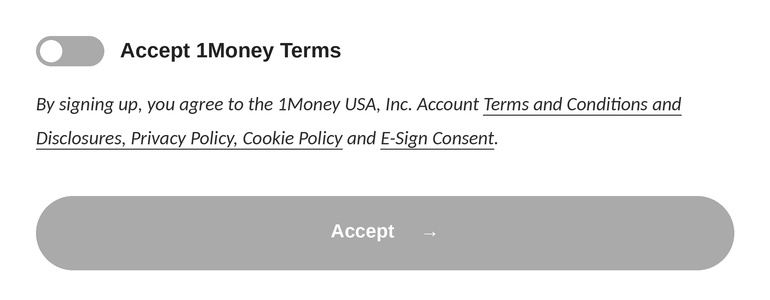
Reference consent block - toggle off by default, disclosure visible, Accept disabled until the toggle is on.
Three things make this screen valid
- The toggle starts off. A pre-ticked box is not consent. The customer has to perform the action.
- The sentence is visible without interaction. Not behind a "read more" expander, not inside a scrollable box, not shrunk below your body text size.
- Accept stays disabled until the toggle is on. Pressing the button alone cannot be the thing that grants consent.
Capturing the timestamp
Record the time at the moment the customer presses Accept — not when the page rendered, and not when your server later receives the onboarding request.
capture.js
acceptButton.addEventListener('click', () => {
  // RFC 3339, UTC, taken at the moment of the click
  const signedAt = new Date().toISOString();
  saveApplicantConsent({ signedAt });
});
Sending it on
One entry per agreement, all sharing the same timestamp:
Initiate Business Account — terms fragment
{
  "terms": [
    { "type": "COMMERCIAL_ACCOUNT_TERMS_AND_CONDITIONS",
      "signed_at": "2026-08-28T14:32:10Z" },
    { "type": "INTERNATIONAL_CUSTOMER_ONBOARDING_DISCLOSURE",
      "signed_at": "2026-08-28T14:32:10Z" },
    { "type": "PRIVACY_POLICY",
      "signed_at": "2026-08-28T14:32:10Z" },
    { "type": "COOKIE_POLICY",
      "signed_at": "2026-08-28T14:32:10Z" },
    { "type": "E_SIGN_CONSENT",
      "signed_at": "2026-08-28T14:32:10Z" }
  ]
}
Timestamps must be RFC 3339 with an explicit UTC offset, and cannot be in the future.
Section 5 - The screenshot pack we need from you
Partner-hosted acceptance is off by default. To switch it on, show us the terms step exactly as your customer sees it. Screenshots are the fastest route that we review the images, not a description of them.
Send seven images
| File | What it shows |
|---|---|
01-desktop-before.jpg | Desktop, before consent. Toggle off, Accept disabled. |
02-desktop-after.jpg | Desktop, after consent. Toggle on, Accept enabled. |
03-mobile.jpg | Mobile at 390px. Whole consent block visible, nothing truncated. |
04-link-terms.jpg | Terms and Conditions opened from your screen, address bar showing. |
05-link-privacy.jpg | Privacy Policy opened, address bar showing. |
06-link-cookie.jpg | Cookie Policy opened, address bar showing. |
07-link-esign.jpg | E-Sign Consent opened, address bar showing. |
How the images should look
- JPEG or PNG, one screen per file. Prefix each filename with your partner name, for example
acme-01-desktop-before.jpg. - At least 1440px wide for desktop, 390px for mobile. Text must be readable at 100% zoom without us enlarging the image.
- Full screen, uncropped. Keep the browser chrome in frame so the URL is visible. Do not crop to just the consent block.
- Your real build, not a mockup. Staging is fine. Design exports and annotated wireframes are not.
- Nothing redacted over the disclosure. Blur customer personal data if you need to, but the sentence and the links stay legible.
Include with the pack
- A sample
terms[]payload from staging, so we can see yoursigned_atformat. - One line on where in your code the timestamp is captured and where it is stored.
- Optional but helpful: a short screen recording of the flow end to end.
Send it to your 1Money account team. We will come back with either an approval or a specific list of changes — never a vague "not yet". Whenever you change the copy, the links or the consent control, send a fresh pack.
WHAT USUALLY GETS SENT BACK
A pre-ticked toggle. The sentence reworded or split across two screens. An agreement named in plain text instead of a working link. Disclosure text set smaller than everything around it. A
signed_attaken from server receipt time rather than the customer's click.
Section 6 - Questions that come up
The hosted link expired before my customer opened it.
Create a new session and share the fresh URL. The previous signature_id cannot be reused, so generate the link at the terms step rather than earlier in your funnel.
Can I move from hosted to partner-hosted later?
Yes. Customers you already onboarded through the hosted page stay valid. New onboardings start using signed_at from the day your flow is approved.
Do I re-collect acceptance for every sub-account?
Acceptance is captured per customer being onboarded. If you are opening several sub-accounts under one customer, check with your 1Money account team how that applies to your setup.
Can I restyle the consent block to match my brand?
Colours, spacing, type and the control itself are yours. The sentence, the four links and the three validity rules are not.
Updated 28 days ago