
Learn how to find transaction RFIs, send the requested information, and keep your case status up to date.
An RFI (Request for Information) is a compliance case used to collect supporting information. Each RFI case is a standalone resource with its own case_id, lifecycle, requirements, submissions, and webhook events.
This guide covers RFI cases whose subject is a transaction, for example a fiat withdrawal or deposit; the transaction appears as the case subject. Cases about a recipient use the same endpoints and are documented in Recipient RFI.
When 1Money needs more information about a transaction, we open a Request for Information (RFI) case. You can also proactively sending us information about the transaction even if it is not required by 1Money compliance team. RFI case keeps all the requirements (if requested by compliance), your responses, and the review status in one place.
The RFI cases are associated with specific transactions, but there is not a strong dependency on both that the RFI case and transaction status can be changed independently. Thus you should check each separately to get the most up-to-date status.
Authentication MethodsThe examples described in this document does not contain authentication. However in sandbox or production environment, it will be required. Please use a bearer token in sandbox and HMAC authentication in production. You can follow guide here for Authentication.
Understand case and each requirement status
An RFI case has an overall status, and each requirement inside it has its own status. Use the case status to understand where the review stands. Use the requirement status to decide which specific items need a response.
Case status
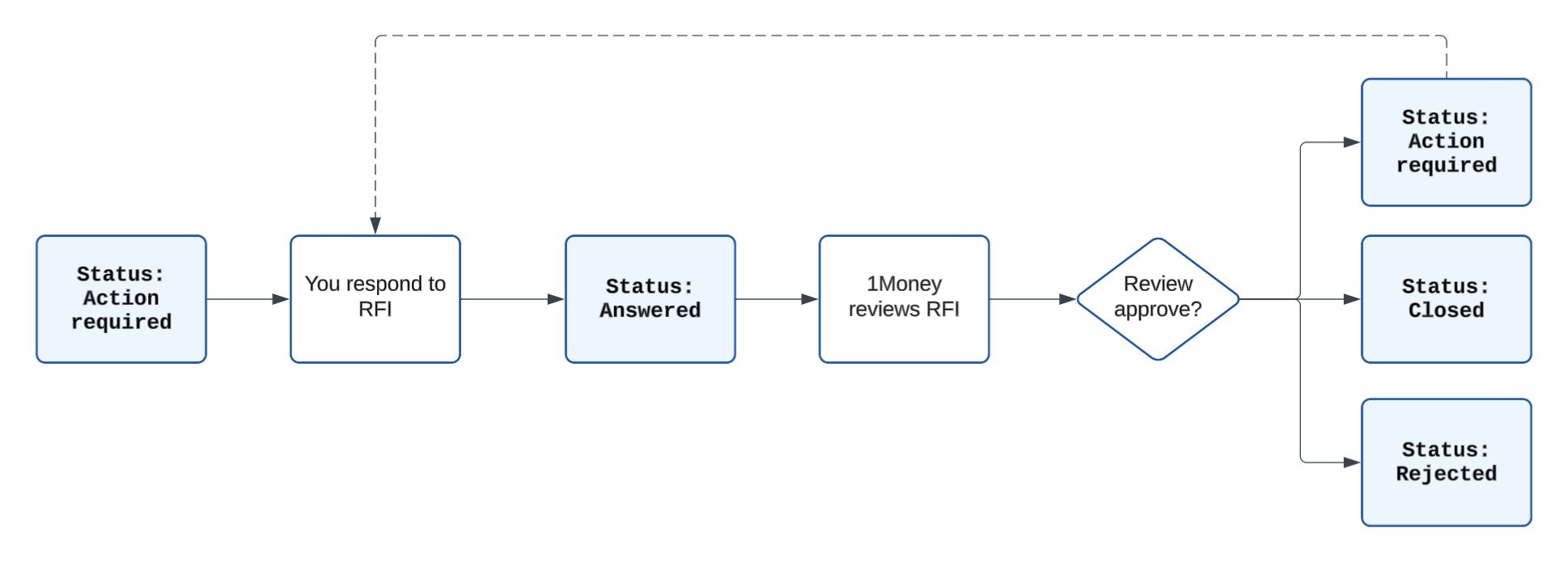
rfi_status | What it means | What you should do |
|---|---|---|
ACTION_REQUIRED | The case is open and needs information from you. | Retrieve the case and respond to the requirements marked ACTION_REQUIRED. |
PENDING_REVIEW | The case is open, but there is currently no requirement for you to answer. | No response is needed now. Keep monitoring the case for a status change. |
ANSWERED | We have received everything requested in the current round and are reviewing it. | Keep monitoring the case. We may ask for more information later. |
REJECTED | We rejected the case, and it no longer accepts new submissions. | Check the related transaction separately to see its outcome. |
CLOSED | We completed our review, and the case no longer accepts new submissions. | No action is needed unless we reopen the case and request more information. |
Once we receive everything requested in the current round, the case moves to ANSWERED automatically. You do not need to call a separate endpoint to submit or complete the case.
The RFI decision does not, by itself, tell you whether the transaction succeeded or failed. Always retrieve the transaction separately for its final status.
Requirement status
Requirement status | What it means | What you should do |
|---|---|---|
ACTION_REQUIRED | This requirement needs a new response. This also covers a previous response that we returned for correction. | Follow the latest note and send the requested TEXT or FILE information. |
ANSWERED | We have received the current response for this requirement. | Nothing for now. Respond again only if the requirement returns to ACTION_REQUIRED. |
Each requirement has a stable requirement_id for correlation. Do not send that ID in a submission path or body; submit your response to the case, and 1Money matches it to the requirement. The case API returns the current evidence for each requirement, not its full submission history.
Choose your integration scenario
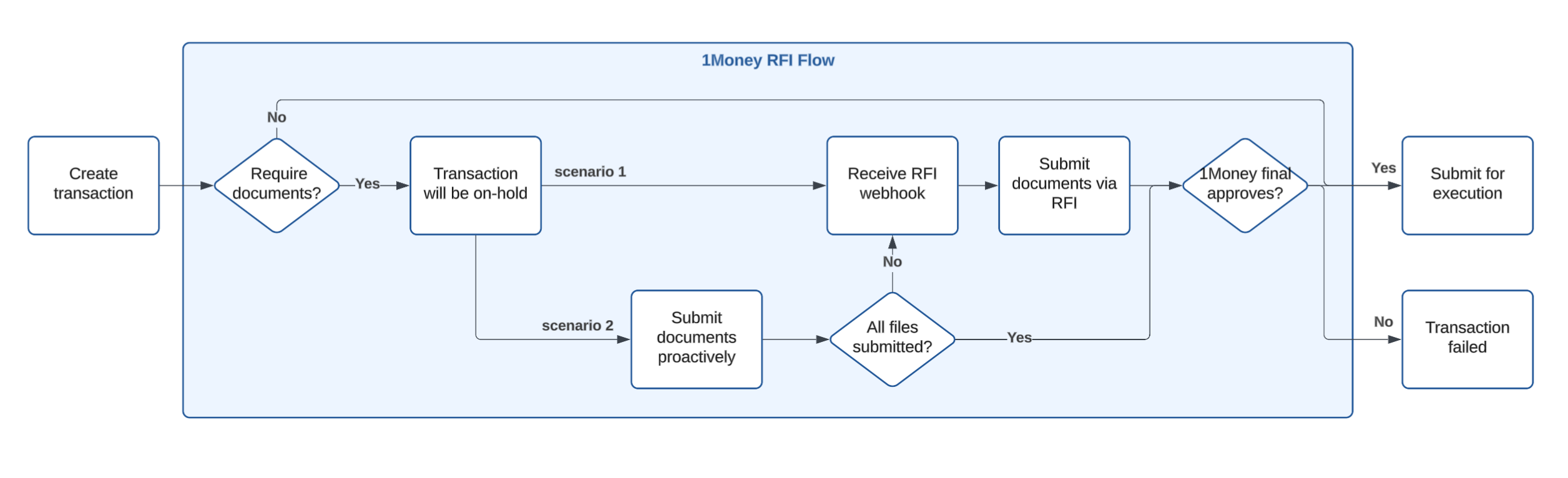
There are two ways to use the RFI APIs. Most integrations only need Scenario 1.
| If you want to... | Follow... |
|---|---|
| Respond to 1Money compliance RFI | Scenario 1: Respond to RFI cases |
| Send transaction information proactively before 1Money asks for it | Scenario 2: Submit transaction information proactively |
Integration RecommendationWe recommend you to start with scenario 1 first. Because scenario 1 covers the entire lifecycle of the RFI. Without full integration of scenario 1, you might have issues responding to RFI and potentially causing delays in your transaction.
You can add proactive submission (scenario 2) later without changing your scenario 1 integration.
Scenario 1: Respond to RFI cases
Use this flow when you want to respond to 1Money's asks for information about a transaction.
Step 1 - Set up your notification method
You need a way to know when a case needs your attention. You can use either webhooks or polling:
- Webhooks — strongly recommended: we notify you when the case changes, and you retrieve the latest case.
- Polling: your system periodically checks for cases that need a response.
Use webhooks whenever your system can receive them. They let you respond sooner and avoid unnecessary API calls. Even with webhooks, run a slower polling job as a safety net in case a delivery is missed.
Webhook integration — strongly recommended
Subscribe to these events:
| Event | What happened |
|---|---|
rfi.transaction.action_required | We need more information from you. |
rfi.transaction.answered | We received everything requested in the current round and can start reviewing it. |
rfi.transaction.rejected | We rejected the case. |
rfi.transaction.closed | We completed our review and closed the case. |
Each webhook tells you which case and transaction changed:
resource.type=rfi_casesandresource.id={case_id}identify the case.data.subject.id={transaction_id}identifies the related transaction.
The webhook only tells you that something changed. It does not contain the complete case information. When you receive one:
- Verify the webhook and make sure you have not already processed it.
- Read the
case_idfromresource.id. - Retrieve the latest case from
GET /v1/customers/{customer_id}/rfi-cases/{case_id}. - Check
rfi_statusand each item inrequirementsto decide what to do next.
Polling and recovery checks
If your system cannot receive webhooks, poll the list endpoint for cases that need a response:
GET /v1/customers/{customer_id}/rfi-cases?action_required=true&page=1&size=100Even if you use webhooks, run this request periodically to catch anything you may have missed. To catch up on all case changes since your last successful check, use updated_from:
GET /v1/customers/{customer_id}/rfi-cases?updated_from={ISO_8601_UTC}&page=1&size=100The updated_from filter includes cases updated at the exact timestamp you provide. This means the last case from one check may appear again in the next. Read every page, and use case_id and updated_at to avoid processing that boundary case twice.
Step 2 - Check what you may need before creating a transaction (optional)
Before you create a transaction, e.g. fiat withdrawal to an external account, call the preview endpoint. This returns you a list of required document for that specific transaction that you are going to trigger:
POST /v1/customers/{customer_id}/transaction/requirement
Content-Type: application/json

{
  "external_account_id": "ffb9e832-8e64-11f0-b308-2eaa4f6974f2"
}
Example response:
{
  "required": true,
  "requirements": [
    {
      "type": "FILE",
      "accepted_document_types": [
        "CONTRACT_AGREEMENT"
      ],
      "note": ""
    }
  ]
}
In this example, prepare the contract before creating the withdrawal. The public RFI submission endpoints require an existing transaction ID, so you can submit it only after the withdrawal has been created.
The preview shows what we know at the time when this API endpoint is executed. It does not create an RFI case or lock in any future requirements that might be requested by our compliance team.
Step 3 - Initiate the transaction
Create the transaction through the usual transaction API and save its transaction_id. You can then submit the prepared information proactively using Scenario 2, or respond to an RFI case when notified. Previewing requirements does not submit documents.
There are two cases:
- Your transaction requires documents upload: You will receive RFI notification. You can follow the rest of this guide to respond
- Your transaction does not require any document upload. In this case, you can either do nothing OR you may also follow Scenario 2 to send any documents proactively.
Step 4 - Receive the case notification
If you use webhooks, wait for rfi.transaction.action_required. If you use polling, list cases with action_required=true.
Request:
GET /v1/customers/{customer_id}/rfi-cases/{case_id}Example response:
{
  "case_id": "TC-ZUB6-KVTF",
  "case_class": "TRANSACTION",
  "rfi_status": "ACTION_REQUIRED",
  "subject": {
    "type": "TRANSACTION",
    "id": "a0583919-cfb2-4f4d-9a71-dfbf33c74fc3",
    "transaction_type": "FIAT_PAYOUT_THIRD_PARTY"
  },
  "requirements": [
    {
      "requirement_id": "RQ-2XBX-AREM",
      "type": "TEXT",
      "accepted_document_types": [],
      "required": true,
      "status": "ACTION_REQUIRED",
      "note": "Please reply with purpose of payment",
      "submissions": []
    },
    {
      "requirement_id": "RQ-ZN66-X7MM",
      "type": "FILE",
      "accepted_document_types": [
        "CONTRACT_AGREEMENT"
      ],
      "required": true,
      "status": "ACTION_REQUIRED",
      "note": "",
      "submissions": []
    }
  ],
  "created_at": "2026-07-27T07:59:32.675+00:00",
  "updated_at": "2026-07-27T07:59:32.675+00:00"
}
You can find that there are two requirements. One is text type and the other is file type.
Step 5 - Send the requested information
If the case asks for a TEXT response, send the requested explanation:
POST /v1/customers/{customer_id}/rfi-cases/{case_id}/submissions
Idempotency-Key: 550e8400-e29b-41d4-a716-446655440000
Content-Type: application/json

{
  "type": "TEXT",
  "text": "The payment is for our internal rebalance."
}
If the case asks for a FILE, send multipart/form-data with these parts:
| Part | What to send |
|---|---|
type | FILE |
document_type | One value from the requirement's accepted_document_types |
note | A short, nonblank explanation of what the file contains |
file | The original file, including its filename |
Include a new UUID in the Idempotency-Key header for each new response.
FILE requests use multipart-specific HMAC signing. Use complete-body signing when your client exposes the final encoded bytes, or native form-data signing with UNSIGNED-PAYLOAD when it does not. See Signing multipart requests for the canonical strings, security properties, Postman script, and language examples.
Retrieve the case again after each response. One response may complete one requirement while others still need your attention.
Step 6 - Continue listening to the webhook for any case status update
After we receive everything requested in the current round, the case moves to ANSWERED and we send rfi.transaction.answered to mark that all requirements are addressed.
ANSWERED does not mean that the review is finished. It means we have what we need for now and 1Money compliance will review the case. If during the review, we request additional information, the case returns to ACTION_REQUIRED and you will receive another notification.
An ANSWERED case can remain open after the transaction reaches a final status because Compliance may continue reviewing it. Do not wait for the case to become CLOSED before treating the transaction as complete.
The transaction and the RFI case do not necessarily finish at the same time. Do not use rfi_status to decide whether a transaction succeeded, and do not use the transaction status to decide whether the RFI is finished. There is possibility that even though a transaction has already been completed, we may still send you RFI request. If the transaction is complete but its RFI case is still ACTION_REQUIRED, PENDING_REVIEW, or ANSWERED, keep monitoring the case and respond whenever a requirement is marked ACTION_REQUIRED.
Scenario 2: Submit transaction information proactively
Step 1 - Initiate the transaction
Sometimes you already have an invoice, contract, or explanation that you want to share before we ask for it. In that case, you can submit the information proactively.
You can do this after the transaction exists, including after it reaches a final status, because the RFI case remains a separate information-collection process. Make sure {customer_id} in the request path is the customer that owns the transaction.
To send a written explanation:
POST /v1/customers/{customer_id}/rfi-cases
Idempotency-Key: 2f3ae894-09de-4839-ad4d-55f80450a493
Content-Type: application/json

{
  "subject": {
    "type": "TRANSACTION",
    "id": "d6e8f011-853c-41d5-81e5-34dfedaac553"
  },
  "submission": {
    "type": "TEXT",
    "text": "Additional context for this transaction."
  }
}
To send a file, use multipart/form-data with:
subject_type=TRANSACTIONsubject_id={transaction_id}type=FILE- one supported
document_type - a nonblank
note - the original
file
For example, in sandbox:
curl --request POST \
  --url 'https://api.sandbox.1money.com/v1/customers/{customer_id}/rfi-cases' \
  --header 'Authorization: Bearer {API-KEY}' \
  --header 'Idempotency-Key: 9bce2438-c910-42f6-91fe-acde3b90537d' \
  --form 'subject_type=TRANSACTION' \
  --form 'subject_id=d6e8f011-853c-41d5-81e5-34dfedaac553' \
  --form 'type=FILE' \
  --form 'document_type=INVOICE' \
  --form 'note=Invoice supporting this withdrawal' \
  --form '[email protected]'
If the transaction has no RFI case, this request creates one with the first response and returns 201 Created. If a case already exists and still accepts information, we add the response to that case and return 200 OK. Save the returned case_id and monitor it in the same way as a case from Scenario 1.
Use a new Idempotency-Key for each distinct submission. Retrying the same content with the same key returns the current RFI case with 200 OK without creating a duplicate submission; reusing the key for different content returns a conflict.
Sending information early does not guarantee that we will accept it or that we will not ask for something else later. If a later requirement does not accept the document_type you already sent, you still need to provide one of its accepted_document_types.
Step 2 - Follow scenario 1 for any follow up RFI actions
After you have submitted the files, there is chance that 1Money reviews and identified additional documents are still required. Then you should follow scenario 1 above to handle the requests from webhook and respond by call the relevant APIs.
RFI endpoints
| Purpose | Endpoint |
|---|---|
| Discover and reconcile cases | GET /v1/customers/{customer_id}/rfi-cases |
| Read one case, its requirements, and current evidence | GET /v1/customers/{customer_id}/rfi-cases/{case_id} |
| Respond to a case with text or a file | POST /v1/customers/{customer_id}/rfi-cases/{case_id}/submissions |
| Proactively submit information for a transaction | POST /v1/customers/{customer_id}/rfi-cases |
| Preview configured requirements before a transaction | POST /v1/customers/{customer_id}/transaction/requirement |
When all currently requested information has been received, the case automatically enters ANSWERED; no separate submit action is required.
Submission requirements
The same validation rules apply whether you are responding to an existing case or sending information proactively:
| Response | What to send |
|---|---|
| TEXT | Send application/json with nonblank text, up to 2,560 UTF-8 bytes. Do not send note, document_type, file, or requirement_id. |
| FILE | Send multipart/form-data with type=FILE, one supported document_type, a nonblank note, and the original file. |
For FILE responses:
- Keep the
notewithin 1,000 characters. - Include a filename of no more than 255 characters.
- Upload no more than 10 MB.
- Use
pdf,jpeg,jpg,png,csv,xls, orxlsx. - Make sure the filename extension matches the file content.
- Send the original file bytes; do not Base64-encode the file or wrap it in a data URI.
When we request a FILE, choose one value from the requirement's accepted_document_types and send it as the submission's document_type. You may send other supporting files, but they do not complete a requirement unless their document_type is accepted by that requirement.
For HMAC-authenticated FILE requests, follow Signing multipart requests.
Supported document_type values
document_type valuesChoose the value that best describes the file you are sending.
document_type | When to use it |
|---|---|
INVOICE | Use this for an invoice that shows what was sold, the amount, the parties, the payment terms, and the payment reference. |
CONTRACT_AGREEMENT | Use this for a signed contract or agreement that explains the parties, their obligations, and the purpose of the transaction. |
CONTRACT | Use this when a requirement specifically asks for a contract, including for country-specific payout requirements. |
SETTLEMENT_STATEMENT | Use this for a statement that shows how the parties calculated or settled the amount due. |
STATEMENT_OF_ACCOUNT | Use this for an account statement whose balances or entries support the payment. |
PURCHASE_ORDER | Use this for a purchase order that identifies the goods or services, quantity, price, and supplier. |
PURCHASE_ORDER-FLIGHT_TICKET | Use this for a purchase order supporting flight tickets for a travel-related payment. |
PURCHASE_ORDER-HOTEL_BOOKING | Use this for a purchase order supporting hotel bookings for a travel or accommodation payment. |
PAYMENT_ORDER_INSTRUCTION | Use this for a payment instruction that identifies the payer, beneficiary, account details, amount, and reference. |
DELIVERY_SLIP | Use this to show that goods were delivered, including when they arrived, what was delivered, and who received them. |
DELIVERY_SLIP-LOGISTIC_BILL | Use this for a logistics bill supporting delivery of goods for a post-payment transaction. |
DELIVERY_SLIP-CUSTOMS_DECLARATION | Use this for a customs declaration supporting delivery of goods for a cross-border transaction. |
DELIVERY_SLIP-BILL_OF_LADING | Use this for a bill of lading supporting delivery of goods for a freight payment. |
CUSTOMS_DECLARATION | Use this for a customs filing that shows the goods, declared value, route, and parties in a cross-border shipment. |
BILL_OF_LADING | Use this for a carrier-issued document that identifies the shipment, sender, recipient, and goods. |
INVOICE_FOR_FLIGHT_TICKET | Use this for an invoice issued for flight tickets. |
VISA | Use this for a visa supporting a travel-related payment. |
HOTEL_BOOKING | Use this for a hotel reservation or booking confirmation. |
TRAVEL_DOCUMENT | Use this for travel documents, such as a passport or visa, when requested for a travel-related payment. |
BENEFICIARY_BANK_DETAILS | Use this to confirm the beneficiary's legal name and bank account details. |
WIRE_INSTRUCTIONS | Use this for wire instructions that show the beneficiary and the routing and account details needed for payment. |
COUNTERPARTY_KYC_DOCUMENT | Use this for KYC documents that verify the identity and legal details of the counterparty. |
PROOF_OF_RELATIONSHIP | Use this to explain how the customer is connected to the beneficiary or counterparty. |
COUNTERPARTY_EVIDENCE | Use this to show the counterparty's role, such as vendor, supplier, investor, or related party. |
IDENTIFICATION_DOCUMENTS | Use this for identity documents belonging to a person connected to the transaction. |
PROOF_OF_ADDRESS | Use this to confirm the current address of a person or business connected to the transaction. |
REGISTRATION_DOCUMENTS | Use this for official incorporation or registration documents belonging to a business or other legal entity. |
BANK_STATEMENT | Use this for a bank statement that shows the source of funds or account activity behind the transaction. |
TRADING_INVESTMENT_STATEMENT | Use this for a statement that shows trading or investment activity, holdings, proceeds, or distributions. |
CAPITAL_CONTRIBUTION_EVIDENCE | Use this to show that the funds came from a shareholder, partner, or another capital contribution. |
DISTRIBUTION_REPAYMENT_EVIDENCE | Use this to show that the payment is a distribution, loan repayment, refund, or similar return of funds. |
SOURCE_OF_FUNDS_EXPLANATION | Use this for a written explanation of where the funds came from and what activity generated them. |
WALLET_OWNERSHIP_EVIDENCE | Use this to show control or ownership of a digital asset wallet, for example through a verifiable on-chain signature. |
TRANSACTION_HASH | Use this when the transaction hash identifies the relevant on-chain transfer. |
EXCHANGE_STATEMENT | Use this for a statement from a digital asset exchange that shows the account, holdings, or transaction activity. |
STABLECOIN_MINT_REDEMPTION_EVIDENCE | Use this for records that support a stablecoin mint or redemption linked to the transaction. |
BLOCKCHAIN_TRANSACTION_SUPPORT | Use this for other blockchain or on-chain evidence that supports the movement of digital assets. |
REVISED_INVOICE_AGREEMENT | Use this for a corrected or updated invoice or agreement that addresses an issue we identified. |
EXPLANATION_LETTER | Use this for a letter that gives us more context about the transaction, its purpose, or the parties involved. |
DISCREPANCY_EXPLANATION | Use this to explain a mismatch between the transaction details and the information or documents already provided. |
UPDATED_PAYMENT_REFERENCE | Use this to provide a corrected or updated payment reference for the transaction. |
OTHER_SUPPORTING_DOCUMENT | Use this only when the file is relevant but does not fit any of the more specific document types above. |
Recipient cases use a separate, shorter list; see Recipient RFI. The recipient-only values (STANDARD_RECIPIENT_INFORMATION, RECIPIENT_BUSINESS_DETAILS, RECIPIENT_ADDRESS_REGISTRATION, RECIPIENT_CONTACT_DETAILS) appear in the API enum but are rejected on transaction cases.
Country specific document requirementsNote that we have country specific documents requirements. Please check here.
Related guides
- RFI webhooks explains each event and how to recover missed or repeated deliveries.
- Recipient RFI covers cases whose subject is a recipient; Compared with Transaction RFI lists what differs and what an existing integration needs to change.
- Signing multipart requests explains both FILE signing modes and includes Postman and language examples.
- Authentication explains sandbox bearer tokens and production HMAC authentication.